Archicad Educational: The CAD for creative architects and designers
Explore Archicad Educational, a free way to use the GRAPHISOFT software that empowers future architects in the Architecture-Engineering-Construction (AEC) industry. It's a top-tier Building Information Modeling (BIM) tool that connects conceptual design and construction phases seamlessly.
Top Recommended Alternative
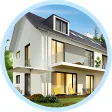
Become part of the visionary architects transforming the AEC industry. Experience Archicad today for an unparalleled design adventure!
What is Archicad?
Archicad is a sophisticated software tool designed explicitly for architects within the Architecture-Engineering-Construction (AEC) industry. Developed by GRAPHISOFT, it facilitates the entire architectural process, starting from the conceptual phase and extending all the way through to the construction phase.
As a Building Information Modeling (BIM) software, Archicad allows architects to work within a BIM environment, providing a comprehensive set of tools for designing buildings. It operates seamlessly on both macOS and Windows platforms, ensuring accessibility and functionality regardless of the operating system.
The software's capabilities go beyond just design; it fosters collaboration within architectural teams and across various disciplines, both locally and globally.
Archicad's integration within the GRAPHISOFT ecosystem ensures a smooth workflow, especially in conjunction with solutions like BIMcloud and BIMx, fostering an OPEN BIM environment.
Every year, a fresh edition of Archicad hits the market, each one advancing the program's objective of ensuring design freedom by minimizing technical hurdles.
What is Archicad Educational?
Achicad Educational is a version of Archicad specifically tailored for students, teachers, and educational institutions in the field of architecture, engineering, and construction (AEC). It's a special offering designed to support learning and teaching activities within academic settings.
This version provides access to the complete set of Archicad's powerful tools and features. It allows students to learn and practice BIM (Building Information Modeling) principles, empowering them to create, design, and analyze architectural projects using industry-standard software.
Educational institutions can deploy Archicad in computer labs, enabling students to gain hands-on experience in a professional-grade BIM environment. The software is often available through a free 1-year license, extendable for the duration of a student's or educator's academic status.
However, the educational version typically comes with usage restrictions, such as limitations on commercial projects, and may require verification of student or educator status through school email addresses or educational institution affiliations during registration.
Archicad features you need to know
Archicad, as a leading Building Information Modeling (BIM) software, offers a comprehensive array of features that empower architects throughout the entire architectural design process. Here are some key features:
- BIM environment: Archicad provides a robust BIM environment, allowing architects to work with intelligent 3D model-based processes to plan, design, construct, and manage buildings.
- Cross-platform functionality: It operates seamlessly on both macOS and Windows platforms, offering a consistent and efficient experience across operating systems.
- Versioning: Releases a new version annually, ensuring architects have access to the latest tools and enhancements for their design needs.
- Signature buildings: Each version of Archicad showcases signature buildings designed using the software, emphasizing its capabilities and serving as inspiration for architects.
- Localization: Available in 28 language versions, providing tailored architectural content and tool defaults optimized for various local markets.
- GRAPHISOFT Ecosystem Integration: Integrates smoothly into the GRAPHISOFT ecosystem, ensuring compatibility and efficient collaboration with solutions like BIMcloud and BIMx.
- Design tools: Offers a suite of powerful design tools, including algorithmic design capabilities and support for large-scale models.
- Visualization: Professional architectural visualization tools translate conceptual designs into compelling imagery, aiding in presenting and communicating design ideas effectively.
- Collaboration: Facilitates seamless collaboration among teams and stakeholders, regardless of their location, promoting efficient workflow and open BIM standards.
These features collectively empower architects to focus on their design expertise while leveraging advanced technology to streamline workflows, foster collaboration, and efficiently manage architectural projects from conception to completion.
Is Archicad free to use?
Archicad isn't completely free for everyone. But if you're a student or educator, you can get a free 1-year license. It's perfect for learning and teaching purposes. Just sign up using your school email, and you might be able to extend it while you're still a student or educator.
For other uses or if you're not a student/educator, you'll need to buy a full license to use Archicad's complete features.
Is Archicad a CAD or BIM?
Archicad is a BIM (Building Information Modeling) software, focusing on intelligent, data-rich models that go beyond traditional CAD (Computer-Aided Design) tools. It incorporates information about building components and their relationships, enabling comprehensive analysis and informed decision-making throughout a construction project's lifecycle.
Archicad alternatives worth trying
Several alternatives to Archicad exist in the realm of BIM (Building Information Modeling) software. Some notable ones include:
- Revit: Developed by Autodesk, it's a robust BIM software widely used in the AEC (Architecture, Engineering, and Construction) industry.
- Vectorworks Architect: Offers BIM capabilities along with strong 2D drafting and 3D modeling tools.
- Allplan: Known for its powerful features in architecture, engineering, and construction.
- Bentley AECOsim Building Designer: Focuses on infrastructure projects and has comprehensive BIM capabilities.
- SketchUp with BIM Extensions: Initially a 3D modeling tool, SketchUp integrates BIM capabilities through various extensions.
Each alternative has strengths and focuses on different aspects of BIM and design. The choice often depends on specific project needs, familiarity with the software, and the preferences of architectural firms or individual users.
Is it hard to learn Archicad?
Learning Archicad varies based on your familiarity with design software. It's user-friendly, with tutorials and a well-structured interface, making it accessible for newcomers. Practice helps grasp its extensive capabilities over time.
Archicad can help you in various ways
Unlock the potential of architectural design with Archicad Educational! Specifically designed for students, educators, and academic institutions, Archicad Educational provides a powerful learning platform for budding architects. Gain access to industry-standard BIM tools, explore intricate designs, and shape the buildings of tomorrow.
Experience Archicad's complete suite of features, free for a year and extendable throughout your academic journey. Sign up using your school email to embark on an educational adventure in architectural innovation. Start designing, creating, and mastering the art of BIM with Archicad Educational today!










.png)